
BETA — Limited Early Access
When there's a dispute, the record speaks — for both of you.
Proof of Work. Peace of Mind.
CrewBrief turns field work into signed, payment-ready proof — GPS-documented, photo-documented records both sides can stand on, from accepted terms to a sealed record. Built for specialty trade crews — electrical, mechanical, low-voltage, fire, demo — and every contractor who has finished disputed work and waited months to get paid for it.
What It Is
A proof trail for every job. Not a payroll app.
CrewBrief is not a time-tracking app. It does not process payroll. It creates a verifiable, exportable record of what was agreed, who showed up, what was documented, and what was approved — so you have proof when you need it.
How It Works
The Proof Trail
- 📋01
Job Created
The company creates a job with scope, rate, and terms.
- 📩02
Worker Invited
The worker receives an SMS invite to the job.
- ✍️03
Terms Accepted
Worker reviews and accepts job terms before clocking in.
- 📍04
Clock-In + GPS + Photo
GPS snapshot and photo captured at clock-in.
- 📷05
Work Documented
Optional mid-session photos and notes.
- 🏁06
Clock-Out + GPS + Photo
GPS snapshot and photo captured at clock-out.
- ✅07
Company Approval
The company reviews and approves or objects to the session.
- 📄08
Proof Record Exported
PDF proof record generated and locked.
The App
See It In Action
Three key moments in the proof trail — from job creation to GPS clock-in to the final exportable record.
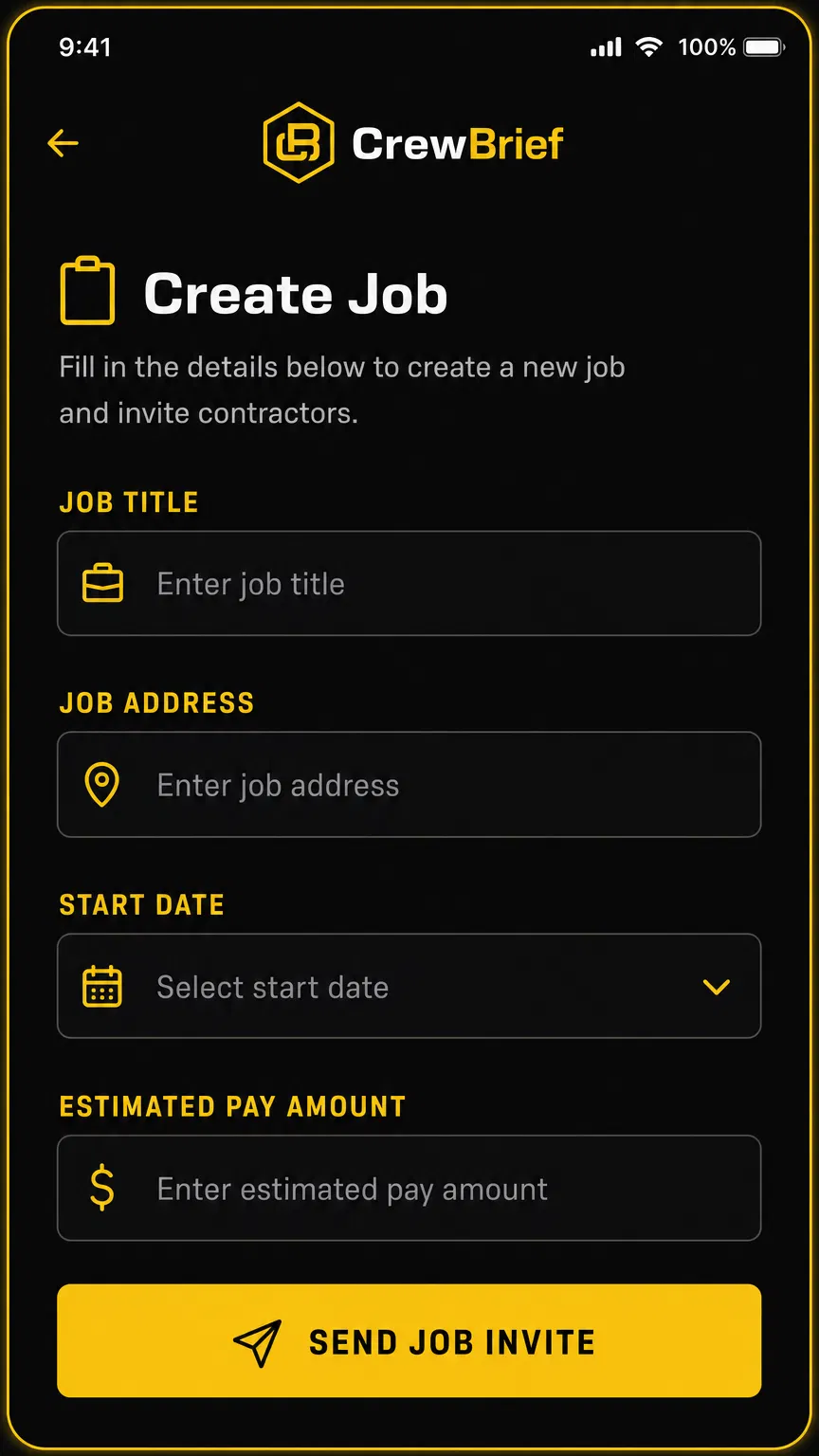
01 — Create Job
Set scope, rate, and terms. Send the invite.
 KEY STEP
02 — GPS Clock-In
Location documented. Photo captured. Timestamp locked.
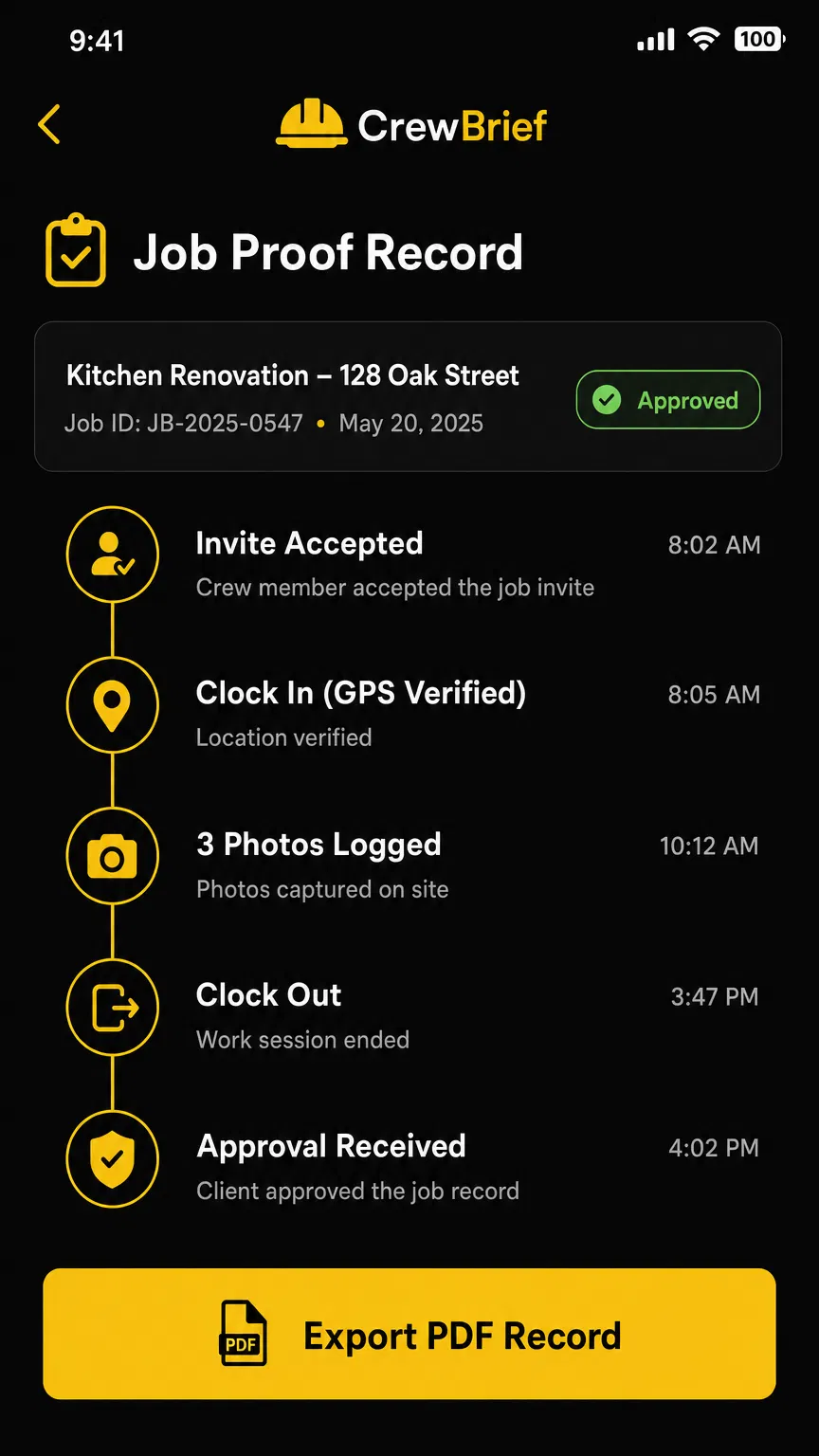
03 — Proof Record
Full audit trail. Export as PDF. Dispute-ready.
Features
Built for the Field
GPS Snapshot Documentation
Every clock-in and clock-out captures a GPS coordinate snapshot — not live tracking. The record shows where your crew was at the moment they punched in, nothing more.
Photo-Documented Work
Workers upload site photos at clock-in and clock-out. Photos are timestamped, GPS-tagged where available, and tied to the job record. Proof that work happened.
Accepted Job Terms
Every worker reviews and accepts the job scope, rate, and terms before they can clock in. No verbal agreements. No disputes about what was agreed.
Company Approval Flow
You review hours, photos, and work notes before approving. Object to a session, override a clock-out, or mark it approved — all tracked with a timestamp.
Exportable Proof Record
Generate a PDF proof record for any job: accepted terms, GPS snapshots, photos, hours logged, amounts due, and approval status. Built for lenders, investors, and disputes.
Built to Be Court-Ready
CrewBrief is operated by CrewBrief LLC, a Texas company — built so every record stands on its own: tamper-evident, exportable, and defensible across every industry that runs field crews.
GPS Capture States
GPS
CrewBrief records the GPS state at clock-in and clock-out. The record is always honest about what was captured.
CAPTURED
GPS coordinates captured successfully at time of clock-in/out.
FLAGGED
GPS signal was weak or coordinates fell outside the expected job site radius.
UNAVAILABLE
GPS permission denied or device location was off. Clock-in still recorded without coordinates.
The Proof
This is what a sealed record looks like
Every approved session locks into a tamper-evident PDF: accepted terms, GPS snapshots, photo proof with verified hashes, the full audit trail — sealed at approval and never editable afterwards. Download a real render generated by the same code that produces customer records (sample data).
Download a sample record PDFTwo Sides, One Record
Built for whoever you are
Industries
Built for any industry that manages crews
One workflow. GPS-documented clock-in, photo documentation, signed work orders, and locked proof records — across every field.
Construction & Trades
GCs, subs, drywall, electrical, plumbing, roofing
Landscaping & Grounds
Lawn crews, irrigation, tree service, multi-site
Property Management
Maintenance crews, rehab teams, rental turnover
Film & Production
Day players, crew call times, location verification
Events & Hospitality
Event staff, setup/breakdown crews, venue workers
Oil & Gas / Energy
Field technicians, inspection crews, rig support
Security Services
Guard check-ins, post verification, shift documentation
Cleaning & Janitorial
Commercial cleaning, property service teams
Logistics & Delivery
Last-mile crews, warehouse labor, loading dock
Agriculture
Seasonal farm labor, harvest crews, field workers
Real Estate & Lending
Fix-and-flip rehabs, lender draw documentation, dispute protection
Government Contracting
Field workers on government job sites, compliance docs
Custom
Any industry. Define your own crew roles and terminology.
Don't see your industry? The Custom option lets you define your own crew roles and terminology at onboarding.
See It In Action
The dashboard is live
Create your account, post a job, and see the full proof trail in action — GPS states, photo documentation, work order signature, approval flow, and sealed proof record export.
Pricing
Pricing coming soon.
We're finalizing tier structure based on beta feedback. Create your free account now — beta members lock in early access rates before public pricing goes live.
WHAT BETA MEMBERS GET
Early Access Rate
Locked in before public pricing is announced
Priority Onboarding
First in line when the app goes live
Feature Input
Direct line to shape what gets built in Phase 2
FAQ
Common questions.
Straight answers. No marketing spin.
Does CrewBrief track my location all day?
No. CrewBrief captures GPS coordinate snapshots at the moments you act — clocking in or out at a stop. There is no background location access and no movement history. The record shows where you were at each punch, nothing more.
Can a worker fake their GPS location?
CrewBrief uses the device's native GPS — the same signal used by Google Maps and Apple Maps. Spoofing it requires third-party apps and deliberate effort. The geofence radius is set by the company at job creation, so a clock-in from across town is automatically blocked. The GPS coordinate is also stored in the audit trail, so any anomaly is visible on review.
I have W-2 employees, not 1099 workers. Does CrewBrief work for me?
Yes. CrewBrief supports both worker classifications. When you create a job, you choose W-2 Employee or 1099 Contractor. W-2 workers skip the Independent Contractor Agreement entirely, and their records are kept under employee rules. Every worker verifies with a phone they control — the same one-time-code verification for W-2 and 1099.
What happens if there's a dispute about hours worked?
Either side can raise an objection on a submitted or sealed session. Both parties see the same evidence — GPS snapshots, photos, and work notes. An objection can be resolved as record-upheld, escalated, or adjusted; an adjustment only takes effect when both parties sign the exact same correction. The original sealed record is never edited, and every objection step is logged in the audit trail.
Can I use CrewBrief for tax filing?
CrewBrief is not a payroll processor or tax filing service. What it does is give you a clean, accurate record of every session — hours worked, rate, total paid, and worker classification. The Tax tab on the dashboard shows annual totals per worker, flags 1099 workers who cross the IRS reporting threshold for that tax year, and lets you export a summary for your accountant or payroll software.
What if my worker speaks Spanish?
The worker-facing side of CrewBrief is fully bilingual — English and Spanish. Workers can toggle their language at any point. All key screens (job terms, clock-in, clock-out checklist, work order) are translated. The company dashboard stays in English.
Is my data private? Who can see my sessions?
Session data is scoped to the job. The company that created the job sees all sessions for that job. The worker sees only their own sessions. No other parties have access. CrewBrief does not sell or share your data. Proof records are only generated and shared when you explicitly export them.
What industries is CrewBrief built for?
CrewBrief is built for any team lead who needs GPS-documented, photo-documented proof of work. The core use cases are construction and trades, property management and rehab crews, film and production day players, event staffing, and government contracting. If you manage a crew and need accountability records, CrewBrief works for you.
Early Access
Get Early Access
CrewBrief is in active development. We're onboarding a limited number of companies for the beta. Create your free account and start documenting your first job today.
Create Your Free AccountBy creating an account, you agree to our Terms of Service and Privacy Policy